50+
Websites Delivered

Web accessibility expert
I help businesses identify and fix accessibility issues directly in their website code — without breaking design, performance, SEO, or user experience.
50+ Websites Delivered • 200+ Accessibility Issues Fixed • 5★ Upwork Client Feedback
Manual review and practical remediation guidance. No automated-only score dump.
Real client results
Accessibility work completed for businesses across websites, ecommerce stores, and custom web applications.
"Himanshu did a great job! Knows accessibility very well and got the job done by the time he promised. Definitely recommend."
"Himanshu did a great job and was able to get my website compliant with accessibility in a matter of a few days. Everything looks great and I would recommend him..."
"Himanshu did a great job. He laid out a clear plan based on an audit of my two websites, and executed everything in a matter of days. Would highly recommend..."
"Upped our company website accessibility from 88 to 96 rating for desktop - 86 to 92 mobile."
"Himanshu was prompt, courteous and VERY fast. Working up our next contract for him."
"Great person to work with - very understanding of what needed to be done and clear communications. I will use again for similar projects!"
What clients value
Feedback from completed Upwork projects consistently highlights communication, quality, attention to detail, and reliable delivery.
Accessibility expertise
I perform both accessibility testing and code-level remediation across modern website platforms and custom frontend builds.
Send me your website URL and work email. I will manually review the most important accessibility barriers and share practical next steps before you decide whether to hire me.
Manual review. No automated-only score. No commitment.
Improve your website accessibility without needing to understand WCAG technical requirements yourself.
Accessibility support for Shopify, WooCommerce, Magento, and other ecommerce experiences.
Get accessibility findings, remediation guidance, and testing support for client websites.
Accessibility review and remediation support for React, Next.js, Vue, and custom web applications.
Accessibility insights
WCAG Guide
Simple ways to review common accessibility issues and understand what to improve first.
ADA Compliance
A practical checklist for websites that want clearer guidance on accessibility priorities.
WordPress
Common problems with themes, plugins, heading structure, forms, and keyboard navigation.
Accessibility services
I help businesses identify and fix accessibility barriers in the code that matters most — without sacrificing design, performance, SEO, or user experience.
WCAG accessibility audit and remediation planning for websites, ecommerce stores, and custom web experiences.
Code-level fixes for HTML, CSS, JavaScript, ARIA, keyboard access, focus states, forms, modals, menus, and more.
Practical review of keyboard behavior, headings, buttons, links, labels, and screen-reader compatibility issues.
Hands-on help for recurring issues, design updates, third-party components, and frontend accessibility improvements.
I work on WCAG audits, ADA support, remediation, and PDF accessibility instead of broad general development.
You get clear priorities, screenshots, user impact notes, and fix guidance your team can understand.
I can support remediation after the audit so issues move from a spreadsheet into actual fixes.
Website improvements
Real examples of accessibility barriers identified and addressed while preserving the original design and user experience.
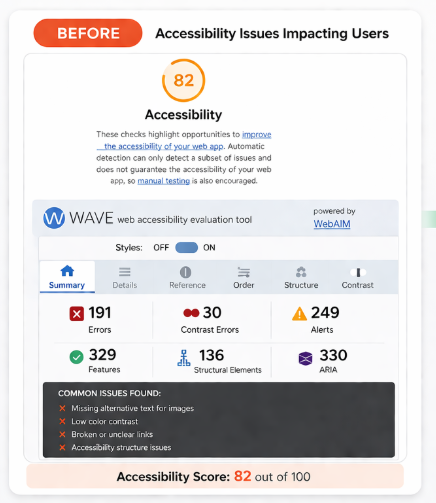
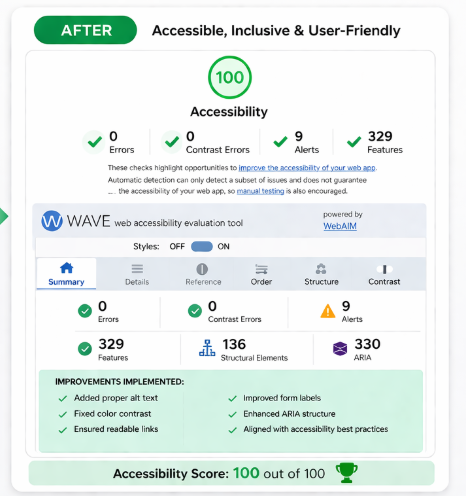
Keyboard and interactive-element accessibility barriers.
Improved keyboard interaction, focus states, semantic HTML and ARIA.
Improved usability while preserving the existing visual design.
A practical accessibility report designed to help you understand issues quickly and fix them without confusion.
Clear issue breakdown so you can prioritize critical, serious, and moderate accessibility barriers first.
Actionable recommendations written to help developers and site owners implement changes faster.
Visual proof of issues so your team can understand where the problem appears and why it matters.
A focused checklist to track fixes, improve accountability, and move your site toward better accessibility.
Not ready for a full WCAG audit? Start with a focused review of your website's most important accessibility issues.
Yes. I support businesses serving users in the United States and can work remotely on audits, remediation, and PDF accessibility projects.
No. I can help identify accessibility issues and also support the remediation work needed to fix them.
Websites, web apps, landing pages, components, forms, and PDFs.
A website accessibility audit helps identify issues that prevent users with disabilities from accessing your website. These issues may include missing alt text, poor color contrast, keyboard navigation problems, and screen reader compatibility issues.
Fixing accessibility issues improves usability, helps meet WCAG guidelines, and reduces ADA accessibility risk. Businesses that serve users in the United States often use accessibility audits to support better legal posture and improve user experience.
My accessibility audit service provides clear issue reports, practical fix recommendations, and optional remediation support to help you improve your website quickly.
Free accessibility assessment
Get a free 1-page accessibility assessment highlighting key accessibility barriers and practical next steps before you decide whether to hire me.